Plenty of company blogs and newsrooms have no RSS feed, or one that stopped updating years ago. A change detection agent watches the list of posts directly and tells you when a new one appears, with its title in the alert.
This example watches the Agenty blog at https://www.agenty.com/blog.
Set up the agent
- Open the agent builder and choose Change Detection.
- Paste the blog or news page URL into Page URL.
- Write the prompt:
Alert me when a new blog post is published, with its title. - Click Set up with AI.
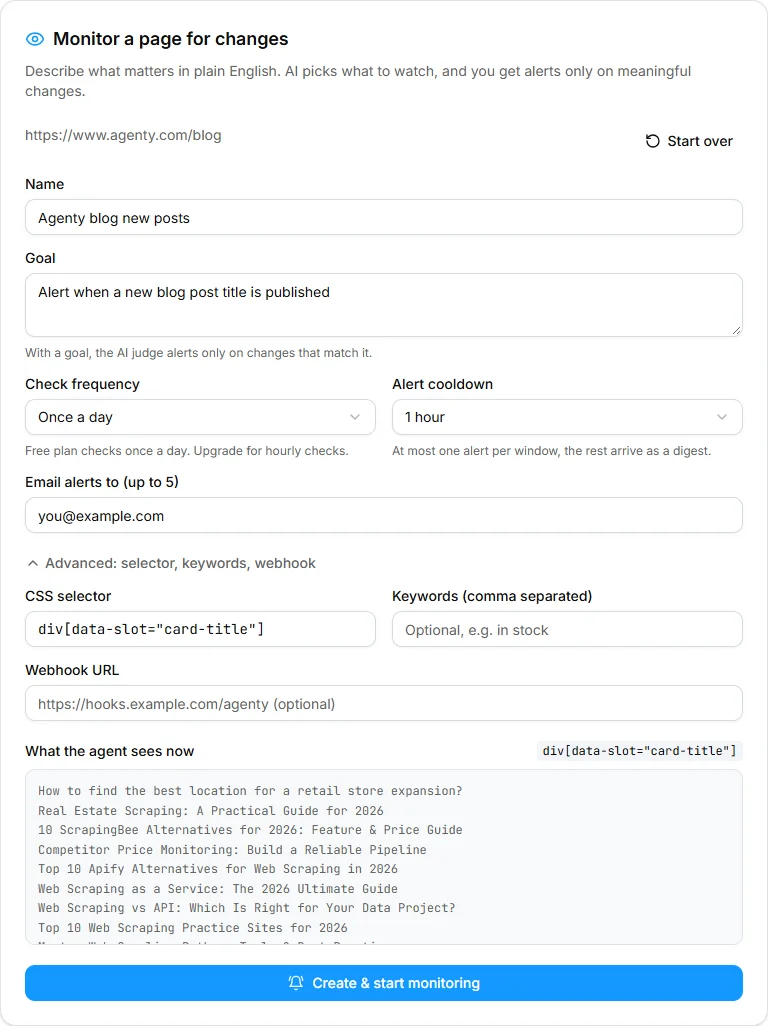
AI chose div[data-slot="card-title"], which matches only the post titles on the page. That's an ideal selector for this job: dates, excerpts, author photos and "5 min read" labels are never compared, and a new post shows up as one added line with its title.
Click Create & start monitoring.
Check the preview first
Blog layouts vary a lot, and sometimes AI picks the wrong block. When we tried the same prompt on another blog, the preview showed only the sidebar headings ("Categories", "Recent Posts", "Newest First") and no post titles. If you see that:
- Open the page in Chrome, right-click a post title and choose Inspect.
- Find a class or attribute shared by all post titles, such as
h2.post-titleorarticle h3. - Open Advanced: selector, keywords, webhook and type it into CSS selector.
Or click Start over and make the prompt more specific, for example "watch the list of article titles in the main column".
Filter by topic
The goal can do more than "any new post". Some examples:
- "Alert when a post about pricing, a product launch or an acquisition is published"
- "Alert when a press release mentions a new partnership"
- "Alert when a new article about web scraping or AI agents is published"
The AI judge reads the new titles and only alerts on the ones that match.
Follow many sources from Claude or ChatGPT
With the Agenty MCP server connected, give your assistant the list of sources and what you care about:
Monitor these blogs and newsrooms and alert me when a new post is
published, with the title. Check every day.
- https://www.agenty.com/blog
- https://example.com/newsroom
Later, ask "summarize what my competitors published this week" and it reads the alerts' history from Agenty. To read a full article as clean text, the assistant can use the get_page_markdown tool, the same thing the bulk URL to Markdown tool does. See Create a website monitor from Claude or ChatGPT.
Related
- How to monitor a website for changes covers every setting.
- Track changelog and release notes updates works the same way for release notes.
- Change detection webhooks and API posts new articles to Slack or a newsletter tool.