Changelogs and release notes are where vendors announce new features, deprecations and breaking changes, and few of them offer a way to subscribe that you'd actually read. A change detection agent reads the changelog on a schedule and, when a new entry appears, sends you a one-line summary with the added text, instead of a link you have to go and check.
This example watches the DaySchedule changelog at https://dayschedule.com/docs/change-log.
Set up the agent
- Open the agent builder and choose Change Detection.
- Paste
https://dayschedule.com/docs/change-loginto Page URL. - Write the prompt:
Alert me when a new release or feature update is added to the changelog, with what changed. - Click Set up with AI.
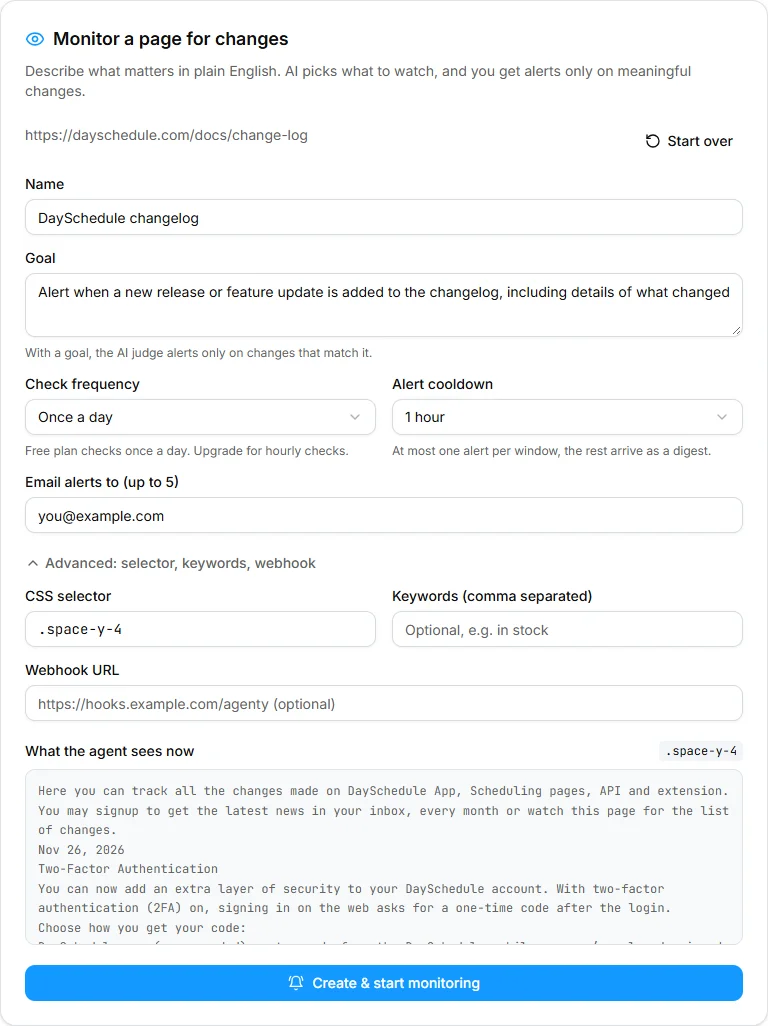
AI chose .space-y-4, the block that holds the changelog entries, and left out the site header, navigation and footer. The preview shows the newest entry at the top: "Nov 26, 2026, Two-Factor Authentication", followed by its description and the entry before it, "Nov 3, 2026, New Layout".
Click Create & start monitoring. The first check stores the current list as the baseline.
What an alert looks like
When DaySchedule publishes a new entry, it's added above "Two-Factor Authentication". The next check finds the new date, heading and description as added lines. The AI judge compares them with the goal, decides it's a new feature update, and writes the summary that goes into the email and the webhook summary field.
Edits that aren't a new release, such as a typo fixed in an old entry or a changed screenshot caption, are saved in the history as Ignored by AI and don't send anything. If you want to hear about every edit, clear the Goal and the agent alerts on any text change.
Make the selector last
.space-y-4 is a Tailwind spacing class. It works today, but utility classes like this can match more than one element and often change when a site is redesigned. If alerts stop or start including unrelated text, open the agent, go to Config, and change CSS Selector under Watch Settings to something more specific, such as main or the element ID of the changelog list. Check the result with Run and look at the content in the Result tab.
Pages that work well
- SaaS changelogs and "What's new" pages, like DaySchedule's.
- API reference pages, to catch a new required parameter or a deprecated endpoint. Use a goal like "Alert when an endpoint, parameter or response field is added, removed or marked deprecated".
- Release notes of libraries and tools you depend on.
- Status and incident history pages.
- Pricing and limits pages of APIs, such as rate limits and model lists of AI providers.
For a docs site with hundreds of pages, read the sitemap first with the sitemap crawler and set up agents for the pages that matter, or use a crawling agent to collect the whole site.
Send updates to your team or your AI agent
Add a Webhook URL and every alert is posted as JSON with the summary and the added and removed lines. Post it to a Slack channel, open an issue, or pass the diff to a coding agent that checks whether your integration is affected. The diff is a few lines, so it costs far fewer tokens than sending the full page. See Change detection webhooks and API.
Set it up from Claude, ChatGPT or Cursor
With the Agenty MCP server connected, you can ask your assistant directly, even from your editor:
Watch https://dayschedule.com/docs/change-log and tell me when a new
release or feature update is added, with what changed. Check once a day.
Claude Code or Cursor calls create_change_detection_agent with your goal. When an alert arrives, ask the same assistant to read the change and check your project for anything that needs updating. See Create a website monitor from Claude or ChatGPT.
Related
- How to monitor a website for changes covers every setting.
- Bulk URL to Markdown converts docs pages to clean Markdown for LLMs.